iOS & iPadOS UI Kit
MiXiD Live Video Mixer
A broadcast control surface inspired by hardware switchers, built for multi-view monitoring, preview/program switching, audio mixing, effects, PTZ control, and live streaming.
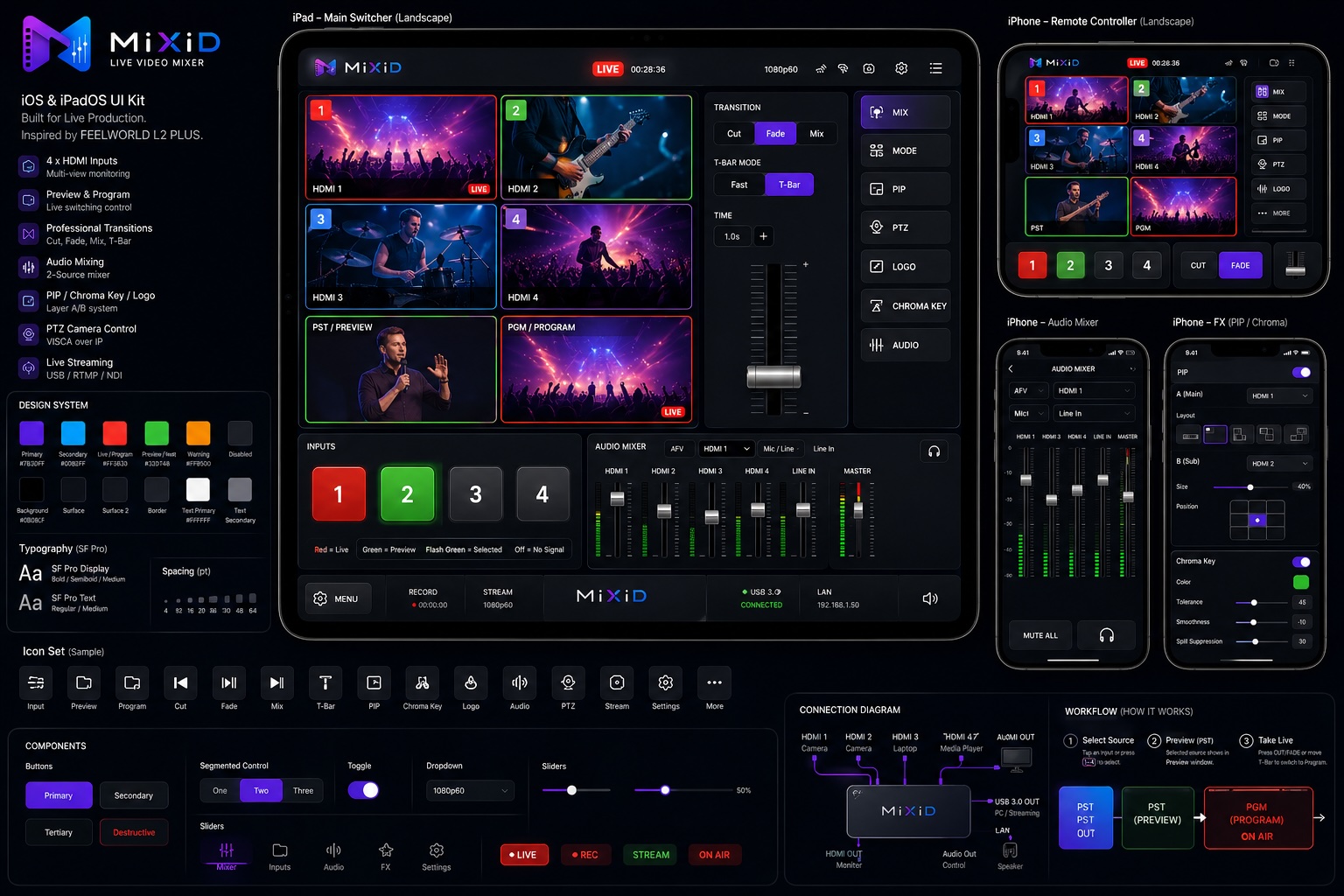
4x HDMI Inputs
Multi-view source monitoring for cameras, laptops, media players, and production feeds.
Preview / Program
Green preview and red program states make the live switching workflow easy to read at speed.
Production Tools
Transitions, audio mixer, PIP, chroma key, logo overlays, PTZ control, and stream status in one interface.
Design Language
The MiXiD appearance follows the UI kit: a dark production environment, glass-like panels, compact controls, vivid source states, and clear operator feedback. The layout prioritizes speed, confidence, and quick visual scanning during live events.
Purple
Primary actions, selected modes, toggles, and focused controls.
Red
Program output, live state, destructive actions, and on-air feedback.
Green
Preview, connected states, ready signals, and confirmed routing.
Workflow
1. Select Source
Choose HDMI, media, camera, or network sources from the input bank and route them into preview.
2. Preview
Check video, audio levels, overlays, PIP, chroma key, and transition settings before switching.
3. Take Program
Cut, fade, mix, or use the T-Bar to move preview to program, then stream or record the output.